Table of Contents
There’s a specific pattern almost everyone falls into the first few months of using Claude seriously, and it’s worth naming because it explains almost every complaint people have about AI not living up to the hype.
You open a new chat. You ask a question. You get an answer. You close the tab. Tomorrow, you open another new chat and start over from nothing — re-explaining your business, your audience, your tone, your goals, as if Claude has never met you before. Because, in every way that matters, it hasn’t.
If you’ve ever hired someone and refused to tell them who they’re working for, what the business already knows, how you like things done, or what they’re allowed to touch — you know exactly how that goes. That’s what a blank Claude chat is.
Then, a few weeks in, the disappointment sets in. “It’s not really saving me time.” “I still have to rewrite half of what it gives me.” “It doesn’t sound like us.” All of that is true, and none of it is really about Claude’s capability. It’s about the fact that nobody ever onboarded it.
Think about what it actually takes to get useful work out of a new hire. You don’t sit a new employee down on day one, hand them zero context, and expect a polished campaign brief by lunch. You tell them who they’re working for. You give them access to what the company already knows.
You walk them through how things get done here. You set up their tools and permissions. Only after all of that do they start producing work that actually reflects your business.
Claude needs the exact same onboarding. It just happens through different mechanisms — and most people have never been shown what those mechanisms are, or why each one solves a distinct problem.
This article walks through that onboarding as four questions, in the order any new team member would actually need them answered, and maps each one to the specific Claude feature built to answer it.
Question One: Who Do I Work For?
Before a new hire writes a single word on your behalf, they need a working sense of who you are as a business — your industry, your audience, the tone you use, and just as importantly, the tone you’d never use. Without that, every piece of work they produce needs a rewrite pass just to sound like you.
Inside Claude, this is the job of Custom Instructions — and it’s worth being precise about what they actually are, because most people either skip them entirely or misuse them.
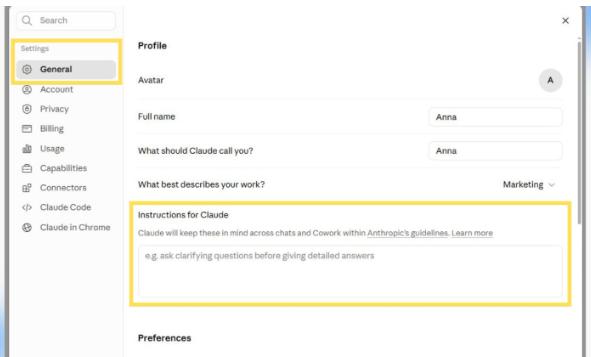
Custom Instructions are global. They apply quietly, in the background, across every new conversation you start, without you having to mention them. This is genuinely different from typing context into a single chat, because a single chat’s context dies when that chat ends. Custom Instructions persist.
What actually belongs here is identity-level information — the kind of thing that’s true regardless of what specific task you’re doing today. Your industry and what you actually sell.
Who your audience is and what they care about. The tone your brand speaks in, described specifically enough that someone who’d never met you could approximate it. And critically, the things you’d never say — the words, phrases, or framing that would feel off-brand even if they were technically accurate.
A genuinely useful test for your Custom Instructions: if you handed only this document to a freelancer who knew nothing about your business, could they write a passable LinkedIn caption in your voice on the first try? If not, the instructions are too thin.
The mistake worth avoiding here is using Custom Instructions as a dumping ground for everything — your formatting preferences, your specific process for writing newsletters, your favorite phrases for calls to action.
That’s not what this layer is for, and overloading it creates a different problem: Claude has to wade through irrelevant detail on every single conversation, including ones that have nothing to do with whatever you stuffed in there. Identity belongs here. Process does not. We’ll get to where process actually belongs.
Question Two: What Do You Already Know?
Once a new hire understands who they’re working for, the next thing they need is access to what the business already knows — past work, existing documentation, decisions that have already been made so they’re not reinvented every time.
A new marketing hire who’s never seen your old campaign briefs, your messaging guidelines, or your client history is going to produce work that’s technically fine and contextually disconnected from everything you’ve already built.
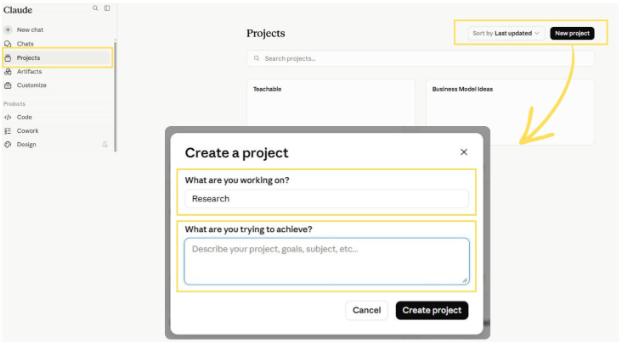
This is what Projects are built to solve, and they solve a different problem than Custom Instructions do — which is exactly why both exist as separate features rather than one combined setting.
A Project is a dedicated, scoped workspace. You can have one for content creation, a separate one for client account management, another for internal research, another for a specific campaign. Each one can hold its own set of reference material — past examples of work you’ve approved, internal documents, brand guidelines, SOPs, whatever represents the accumulated, factual reality of that part of your business.
The distinction that matters here is scope. Custom Instructions apply everywhere, all the time, lightly. Projects apply specifically, within their own boundary, deeply. When you’re working inside your “Client Reporting” Project, Claude should be drawing on the actual reports, templates, and client history you’ve loaded into that specific space — not trying to guess from general knowledge of what a client report probably looks like.
This is also where a lot of the “Claude doesn’t really know my business” frustration actually gets resolved. It’s rarely that Claude lacks the reasoning ability to do the task. It’s that the task required specific, factual knowledge about your business that was never given to it anywhere — not in the prompt, not in Custom Instructions, and not in a Project. Once that knowledge is sitting inside the right Project, the quality difference is immediate and obvious.
A Project loaded with five real examples of work you’ve approved will consistently outperform a much longer, more elaborate prompt written from scratch. Specific, real examples beat abstract description almost every time.
Question Three: How Do You Want This Done?
A new hire who knows your business and has access to your documentation still needs to learn how you actually want repeatable work executed. Every business has processes — not because anyone wrote a manual, but because certain types of work get done the same way every time, with the same steps, in the same order, because that’s what’s been proven to work. A new employee learns this by watching, asking, and gradually internalizing the pattern.
This is where Skills come in, and they solve a meaningfully different problem than either Custom Instructions or Projects.
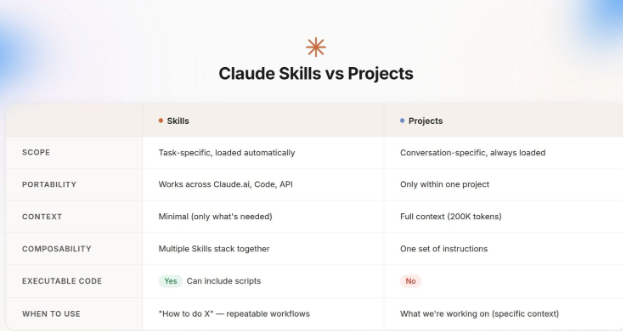
Skills are reusable, structured workflows — instructions that tell Claude not just what you want, but the specific sequence and method for getting there, every time, consistently.
If you write LinkedIn posts a certain way — a hook, a specific structure, a particular kind of close — that’s a Skill. If your client reports always follow the same five-section format with the same kind of analysis in each section, that’s a Skill. If your campaign planning process always starts with audience research, then messaging pillars, then channel selection, in that order, that’s a Skill too.
The practical difference Skills make is significant, and it comes down to a concept worth understanding: progressive disclosure. Claude doesn’t load every Skill you’ve ever created into every single conversation — it determines which Skill is relevant to the task in front of it and loads only that one.
This means you can build a substantial library of highly specific Skills — one for newsletters, one for ad copy, one for quarterly reporting, one for competitor research — without bogging down every single conversation with irrelevant procedural detail. Each Skill stays out of the way until the moment it’s actually needed.
This is also where the meaningful difference between prompting and running a system becomes obvious. Writing a fresh, detailed prompt every time you need a LinkedIn post is prompting.
Having a Skill that already encodes your exact structure, tone calibration, and formatting preferences — so you just say “write a LinkedIn post about X” and the rest happens automatically — is running a system. The output quality can be similar in a single instance. The time and consistency cost over fifty instances is not even close.
A quick way to tell if something should be a Skill
If you’ve caught yourself typing a similar set of instructions more than two or three times, that’s the signal. The test is simple: would a new hire need this explained as “the process we follow,” not just “the result we want”? If yes, it belongs in a Skill, not in a one-off prompt you’re rewriting from memory each time.
Question Four: What Can You Actually Touch?
The final question a new hire needs answered is the most practical one: what systems do I actually have access to, and what am I allowed to do inside them?
Knowing your business, having access to your documents, and understanding your process is still not the same as being able to act — to actually send the email, update the CRM record, or pull the calendar availability without someone else doing it on your behalf.
This is the role of MCP — the Model Context Protocol — and it’s the layer most people either haven’t heard of or haven’t bothered to set up, which is unfortunate because it’s the difference between Claude advising you and Claude actually working alongside you inside your real tools.
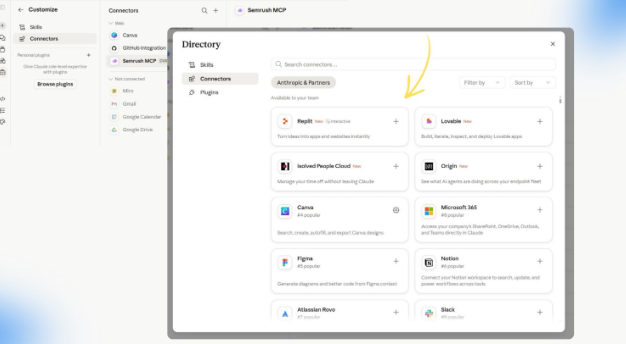
MCP is an open standard that connects Claude to external systems — Google Drive, Gmail, your CRM, your calendar, project management tools, and a growing list of other services.
Once connected, Claude isn’t limited to talking about your calendar in the abstract. It can actually look at it. It’s not limited to describing what a good CRM update might look like. It can make the update.
The distinction between MCP and Skills is worth being precise about, because they’re frequently confused and they solve genuinely different problems. Skills teach Claude how to do something — the procedure, the sequence, the format.
MCP gives Claude something to connect to — the actual external system where that work needs to happen. One is a recipe. The other is the appliance the recipe gets cooked on.
A Skill that says “summarize this week’s client emails into a status update” is far more useful when it’s paired with an MCP connection to the inbox those emails actually live in, rather than requiring you to copy and paste each one in manually.
This is genuinely the layer that turns Claude from “a smart assistant I talk to” into “a working part of my actual operation.” Without it, even a perfectly set-up Claude — clear identity, rich Project context, well-built Skills — is still operating one step removed from where the actual work lives. With it, the gap closes.
Start small with MCP. Connect the one tool that currently creates the most manual copy-paste friction in your week — usually email, a calendar, or a CRM — before trying to wire up everything at once. A focused, working connection beats five half-configured ones.
Why the Order Actually Matters
It’s tempting to treat these four questions as a checklist you can complete in any sequence, but the order genuinely matters, and skipping ahead tends to produce worse results than just being patient.
Connecting tools through MCP before Claude understands who you are and how you work just means it can now make mistakes faster and inside your real systems.
Building elaborate Skills before you’ve loaded real context into a Project means those Skills are executing a great process on top of guessed, generic information. Identity and knowledge need to come first, because everything built on top of them inherits whatever gaps exist underneath.
The practical sequence that works best mirrors how you’d actually onboard a person: establish who you are and how you communicate first (Custom Instructions), give access to what’s already known and decided (Projects), codify how repeatable work actually gets done (Skills), and only then open up the real systems where that work needs to land (MCP).
What This Actually Looks Like in Practice
One place this complete setup becomes genuinely valuable is search and content research — a task that most people still do by manually brainstorming keywords, which is slow and limited to whatever’s already in your head.
With Custom Instructions in place, Claude already knows your industry and your audience without being told again. With a Research Project loaded with your past content and competitor analysis, it has real context to work from instead of generic assumptions.
With a Skill built around how you actually want research structured — channels covered, format of the output, how findings get prioritized — it doesn’t need re-explaining every time you ask.
And increasingly, this kind of research benefits from looking beyond a single search engine: understanding the actual questions people are asking across ChatGPT, Gemini, Claude itself, AI Mode, Reddit threads, and traditional search results gives a far richer picture than keyword volume alone ever could.
The output of that kind of setup isn’t just a longer keyword list. It’s a genuinely better understanding of what your audience is actually trying to find answers to — which is a different, more useful thing entirely.
The Real Point Here
None of this requires technical skill most people don’t already have. It requires patience to do the setup once, properly, instead of re-explaining your business from zero in every new conversation and wondering why the output never quite lands.
The tool was never the bottleneck. A blank chat window with no identity, no context, no process, and no access was always going to behave like a one-day temp — competent in the moment, useless as an asset. Answer the four questions once, and what you’re working with stops being a vending machine and starts being something closer to a real, dependable part of how your business actually runs.
The brands and teams getting real, compounding value out of Claude right now aren’t the ones with the cleverest prompts. They’re the ones who stopped reintroducing themselves every morning and did the onboarding once.
Want help setting up Claude properly across your marketing operation — Custom Instructions, Projects, Skills, and the right tool connections, built around how your business actually works?
The Brisk Digital helps teams turn AI from a daily chat habit into real operating infrastructure.



No Comments