Table of Contents
Small businesses win not because they outspend competitors, but because they stay in the conversation. In 2025 that conversation increasingly starts on Meta (Instagram / Facebook) and moves to WhatsApp — the place where customers ask questions, compare options, and decide to buy.
Meta gives you discovery and intent; WhatsApp gives you immediacy and relationship. Automation makes that relationship repeatable, fast, and scalable — without sounding robotic.
This article is a full, operational guide: detailed message scripts, ad-to-chat funnels, tagging and scoring logic, tech stack decision checks, KPIs to track, common pitfalls and fixes, and a 90-day rollout plan. Read it like a playbook — because you’ll use it as one.
The Meta + WhatsApp Advantage (explained, with nuance)
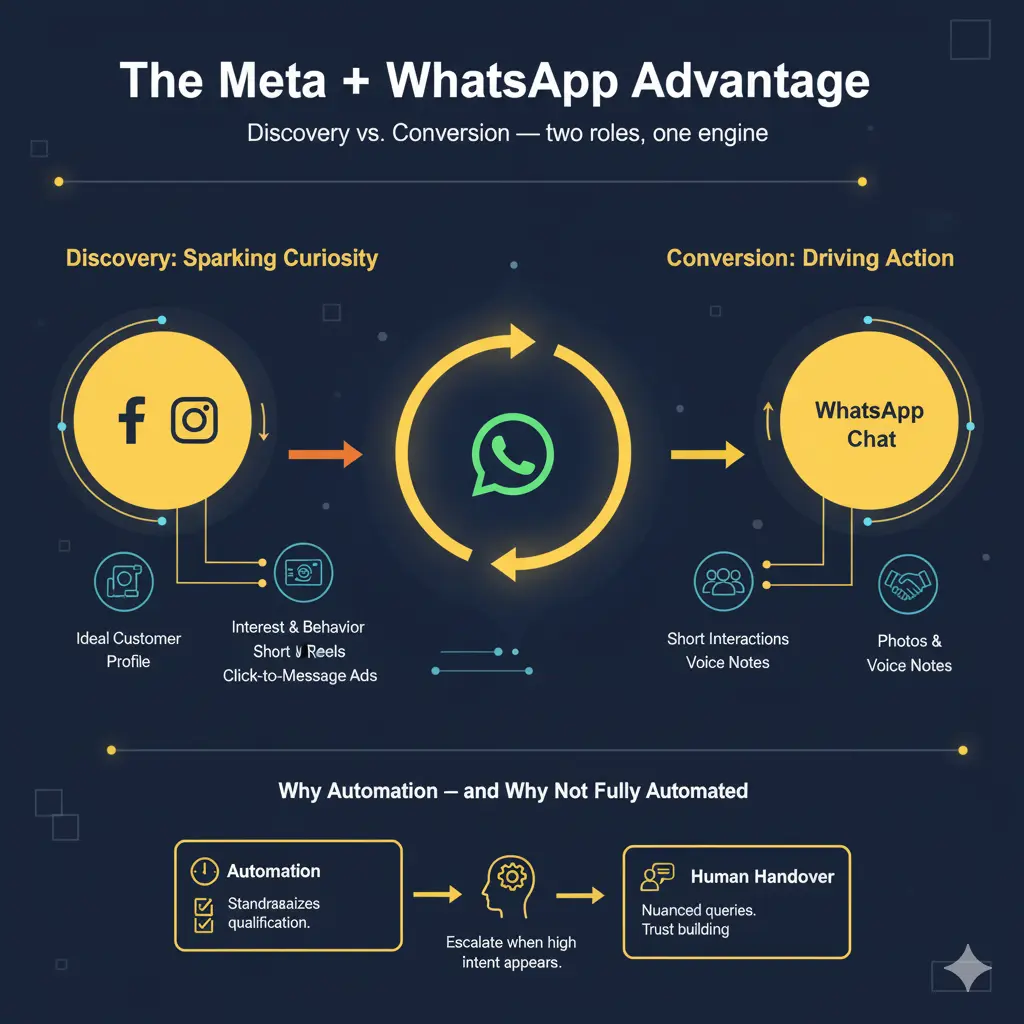
Discovery vs. Conversion — two roles, one engine
- Meta is exceptional at discovery: it surfaces your business to people who match your ideal customer profile via interest, behavior, and lookalikes. It also offers creative formats to spark curiosity — short video reels, carousels, and click-to-message ads.
- WhatsApp is where intent becomes action: direct, private, and expressive. Customers prefer short, conversational interactions to long forms and separate checkout flows. A WhatsApp chat reduces friction: photos, voice notes, invoices, quick clarifications — all in one thread.
Why automation — and why not fully automated
Automation reduces response lag and standardizes qualification. But customers still want humans for nuanced queries: price negotiation, complicated customizations, trust building.
The sweet spot is “automations that hand over to humans.” Design your flows to escalate when complexity or high purchase intent appears.
Building the Funnel: From Meta Ad Click → Qualified Lead → Sale
Below I map the funnel and show exact copy, creative cues, and implementation details for each step.
1) The Hook — Meta Ad Layer (creative + tactical detail)
Your ad’s job is twofold: stop the thumb, and start the chat. That means a visual hook + a conversational CTA.
Creative elements that actually move people
- First 1 second: show the pain or a curious visual (a tear in fabric for tailoring, a clump of hair for a salon). The visual must match the first line of your text to avoid cognitive friction.
- Text overlay: 3–6 words: simple, bold, benefit-driven. Example: “Fix hair fall — now.”
- Ad formats to prioritize: short vertical video (6–15s) for awareness; click-to-message single-image or carousel for direct conversation. A carousel works when you want to show process/steps (Problem → Product → Proof → CTA).
- Mini blueprints for specific MSMEs:
- Local bakery: Video (6–10s) of fresh bread pulling apart + overlay “Cakes delivered in 60 min” + CTA: “Tap to order on WhatsApp”.
- Tailor/shop: Carousel: (1) bad fit, (2) fitting process, (3) finished garment, (4) “Book fit on WhatsApp”.
- Clinic/salon: Short testimonial clip with captioned review + CTA: “Book a free consultation.”
- Local bakery: Video (6–10s) of fresh bread pulling apart + overlay “Cakes delivered in 60 min” + CTA: “Tap to order on WhatsApp”.
Exact CTA copy examples (use as-is)
- “Tap to chat — slots filling fast.”
- “Tap to check price and get the earliest slot.”
- “Ask on WhatsApp — quick reply.”
Ad-to-chat technical tip: Use Meta’s Click-to-Message or Message Template so the user lands in a conversation with context (UTM or campaign tag) already attached. This allows you to pass campaign metadata into the first automated message.
2) The Conversation Starter — WhatsApp flow design (detailed scripts + branching)
When users tap, the first 10 seconds of the chat are decisive. Your opening messages should orient, qualify, and invite.
Governance before you send anything: Always confirm the user opted in to receive messages (implicit opt-in via click-to-message is typical, but be clear: “By continuing you agree to receive messages…”).
Welcome flow — compact, human, with action buttons
| Bot: 👋 Hi [FirstName]! This is [Brand]. Quick one — how can we help today? Buttons: • I want a quote • Book an appointment • Product info • Speak to an expert |
Why buttons matter: Buttons reduce typing friction and give you structured replies that power branching logic.
If user selects “I want a quote” — qualification microflow
| Bot: Great — which service/product are you interested in? Options: [Service A] [Service B] [Custom] If custom: Ask 1 short clarifying Q (e.g., “Tell us the fabric/type in one line”) Then ask: “Which city are you in?” -> Capture location Then: “What’s your preferred timeline? (ASAP / This week / Later)” |
Handover logic
- If high intent (user says ASAP + asks price), escalate to human agent with label hot and transfer the chat along with captured fields (name, city, product).
- If low intent (just browsing), keep on automated nurture but set reminder to nudge in 48 hours.
Tone and microcopy rules
- Be human: use contractions, short sentences.
- Mirror the customer’s language (formal vs. casual).
- Always provide a clear next action.
3) Lead capture & qualification (fields, scoring, tags)
Don’t over-ask. Capture the minimum fields that allow segmentation and follow-up.
Essential data model
- Name
- Phone (already there)
- City / Pincode
- Interest type (product/service)
- Budget bracket (optional; useful for B2C sellers)
- Purchase timeline (ASAP / 7 days / 30+ days)
- Source metadata (campaign_id, ad_id, creative_id)
Sample scoring logic (simple, effective)
- +3 points if user selects Book / Buy directly
- +2 points if timeline = ASAP
- +1 point if budget >= target bracket
- -1 point if user says “just browsing”
Tag taxonomy examples
- lead_hot, lead_warm, lead_cold
- intent_booking, intent_price_check, intent_demo
- channel_meta_instagram, campaign_xxx
CRM mapping example (pseudo JSON)
| { “name”: “Asha”, “phone”: “+91XXXXXXXXXX”, “city”: “Pune”, “interest”: “Hair transplant consult”, “timeline”: “ASAP”, “score”: 7, “tags”: [“lead_hot”,”intent_consult”,”channel_meta_instagram”]} |
Sync this to your CRM in real time. Real-time sync is critical for quick handovers and retargeting.
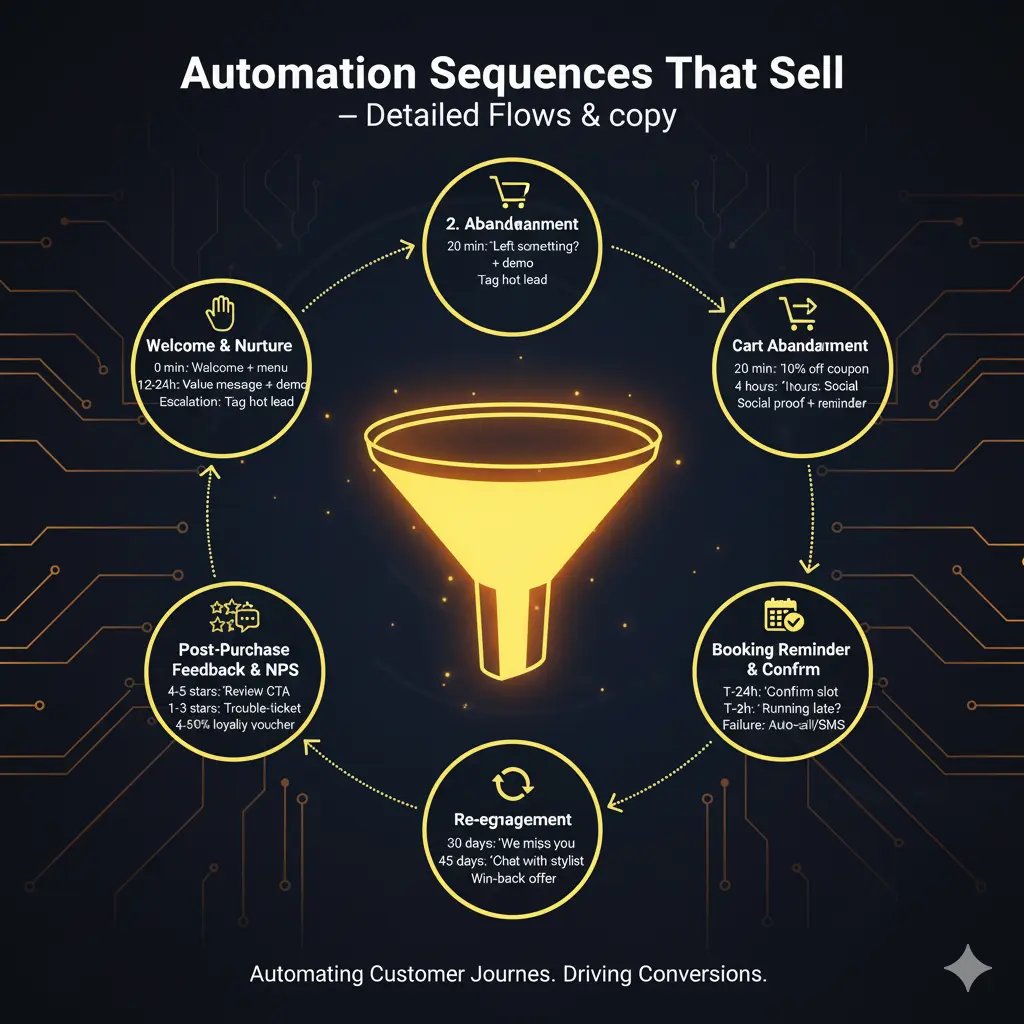
Automation Sequences That Sell — detailed flows & copy
Below are battle-tested sequences. For each, I’ll provide triggers, timing, messages, and escalation rules.
1. Welcome & Nurture (trigger: first interaction)
- Immediate (0 min): Welcome message + menu (buttons).
- After 12–24 hours: If no booking/positive action, send a value message with a short benefit + image or short video.
- Example: “Here’s a 30-second demo of our process — takes 30s to watch. Want a slot?”
- Example: “Here’s a 30-second demo of our process — takes 30s to watch. Want a slot?”
- Escalation: If user responds with a question containing price/booking intent → tag as hot and alert human agent.
2. Cart Abandonment (ecommerce; trigger: abandoned checkout link shared in chat or Shopping Cart abandoned)
- T+20 min: “You left something behind — want help completing it?” + quick link.
- T+4 hours: Offer limited coupon (example: “10% off for next 2 hours”) — use sparingly.
- T+48 hours: Reminder with social proof (testimonial screenshot + CTA) or alternative suggestions.
3. Booking Reminder & Confirm (trigger: booking made)
- T-24 hours: “Reminder: Your slot tomorrow at 3 PM. Reply 1 to confirm.”
- T-2 hours: “Running late? Reply ‘Reschedule’ or call us.”
- Failure to confirm: Auto-call or SMS as fallback and tag for agent follow-up.
4. Post-Purchase Feedback & NPS (trigger: 2 days after service/delivery)
- Message 1: “How was your experience? Rate 1–5.” If 4–5, offer simple CTA to leave a Google/FB review. If 1–3, open a private trouble-ticket and assign to support.
- Message 2 (if 4–5): “Thanks! Would you like a 10% loyalty voucher?” — great for retention.
5. Re-engagement (trigger: 30/60/90 days inactivity)
- T+30 days: “We miss you — here’s what’s new.” Include short carousel of new products or services.
- T+45 days: “Need help picking something? Chat with our stylist/consultant.”
- T+60 days: Win-back offer personalized by last purchase.
Measuring success — the metrics that matter (and how to interpret them)
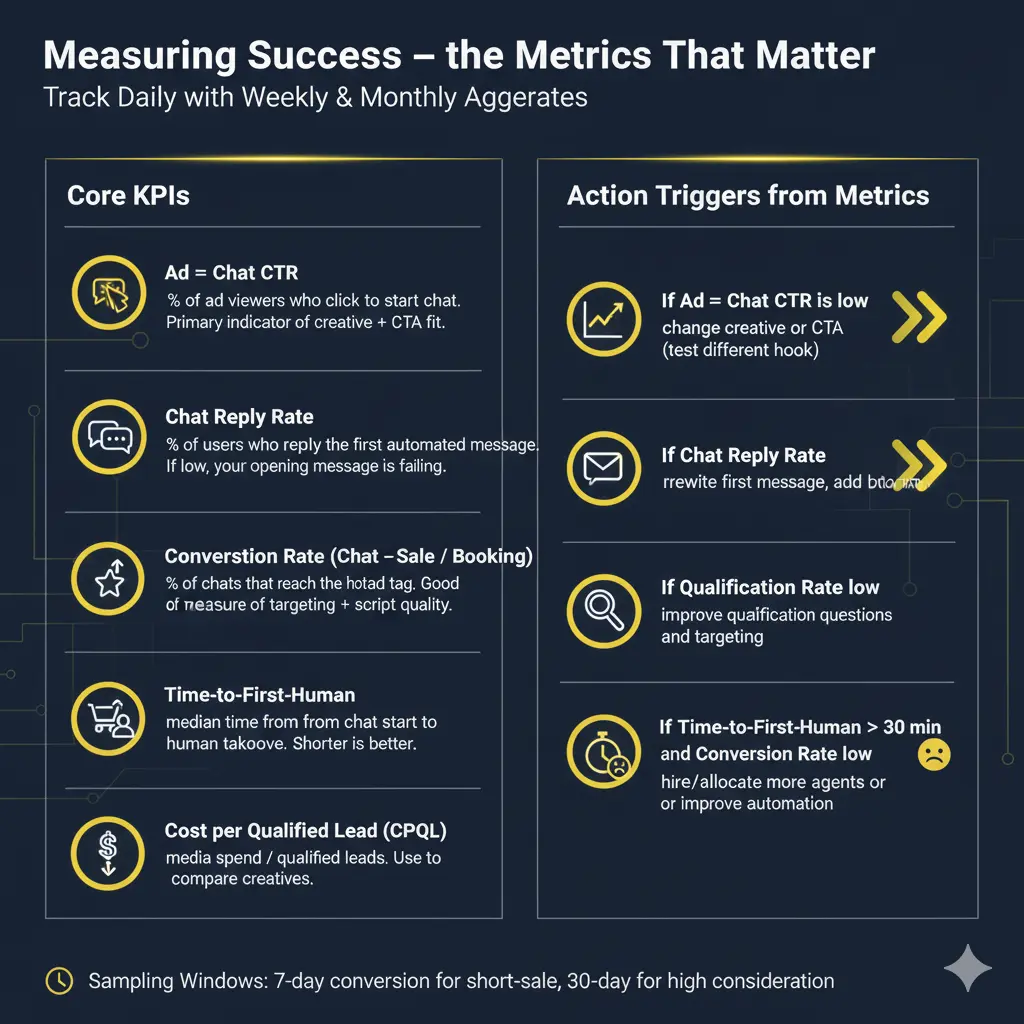
You need a short, focused dashboard for fast decisions. Track daily with weekly and monthly aggregates.
Core KPIs
- Ad → Chat CTR: % of ad viewers who click to start a chat. Primary indicator of creative + CTA fit.
- Chat Reply Rate: % of users who reply to the first automated message. If low, your opening message is failing.
- Qualification Rate: % of chats that reach a hot lead tag. Good measure of targeting + script quality.
- Conversion Rate (Chat → Sale / Booking): ultimate metric. Measure per campaign and per creative.
- Time-to-First-Human: median time from chat start to human takeover for qualified leads. Shorter is better for high-intent queries.
- Cost per Qualified Lead (CPQL): media spend / qualified leads. Use to compare creatives.
Action triggers from metrics
- If Ad → Chat CTR is low: change creative or CTA (test different hook).
- If Chat Reply Rate low: rewrite first message, shorten, add buttons.
- If Qualification Rate low: improve qualification questions and targeting.
- If Time-to-First-Human > 30 min and Conversion Rate low: hire/allocate more agents or improve automation to handle objections.
Sampling windows: Attribution windows vary — use 7-day conversion windows for short-sale items, 30-day for higher consideration items.
Data loop & audience building: turn conversations into fuel
How to make conversational data actionable
- Tag everything: interest, intent, objections (price, time, trust).
- Create micro-audiences from tags: retarget intent_price_check with price-comparison ads; retarget lead_cold with long-form testimonials.
- Feed learnings to creatives: If 40% of chats ask “Is it safe for sensitive skin?”, make a carousel addressing that exact question.
- Measure which creatives drive high-quality conversation: use campaign metadata saved in the first chat message to link ad creative → conversion quality.
Tech Stack — what to pick and why (plus vendor choices)
Core components and selection criteria
- WhatsApp Business Platform — Choose a BSP (Business Solution Provider) that supports message templates, quick replies, contact sync, and webhook integrations. Evaluate uptime, pricing per template/message, and ease of CRM sync.
- Ad platform: Meta Ads Manager + Business Suite (native). Use Advantage+ if you want automated creative allocation, but pair with manual creative testing.
- CRM: Must accept real-time webhooks from your BSP. Look for simple field mapping and ability to create tags and tasks automatically.
- Automation tools / middleware: If you don’t want to code: WATI, Zoko, AiSensy, Gupshup are common choices and have prebuilt connectors. If you have dev resource, connect WhatsApp Cloud API directly to your CRM for full control.
- Analytics layer: Export events into a BI tool (Google Looker / Data Studio) or use a light tool that can show ad → chat → conversion funnels.
Selection checklist
- Real-time sync with CRM?
- Template approval workflows supported?
- Easy tag/score automation?
- Local language support?
- SLA & uptime commitments?
- Transparent pricing on template messages & sessions?
Compliance, privacy, and trust — practical rules (non-negotiable)
- Consent: Capture implicit or explicit opt-in and record the source (campaign id). Keep a timestamp and store in CRM.
- Templates: WhatsApp requires pre-approved templates for outbound non-transactional messages. Build templates for reminders, confirmations, and reactivations — get them approved before running campaigns.
- Data retention & security: Store PII encrypted, limit access to agents, and have a takedown flow for data erasure requests.
- Local regulations: For health or financial services, collect special consents and verify you are compliant with telemedicine/e-pharmacy rules if applicable.
Creative + Automation Alignment — tiny design details that matter
- First image + first message must match. Don’t use a lifestyle shot in the ad and an inventory photo as the first message — it creates cognitive dissonance.
- Use the same tone: if the ad is playful, keep the chat playful. If it’s clinical, keep it clinical.
- Visuals in chat: Send a short product demo or clip (<=15s) when the user asks for proof. Use captions; many will watch without audio.
- Micro-commitments: Use small asks (“Choose A or B”) rather than open-ended questions (“Tell us everything”).
Common pitfalls & fixes (real examples)
- Pitfall: Long, texty first message → low reply rate.
Fix: Use short 1–2 line message + buttons. - Pitfall: No escalation rules → high drop-off when automation can’t answer nuance.
Fix: Build a confidence threshold (if user’s intent contains keywords price/booking or if score > X) and switch to human. - Pitfall: Tagging chaos in CRM → poor retargeting.
Fix: Standardize tags and enforce them via automation; remove obsolete tags monthly. - Pitfall: Templates not approved and messages blocked.
Fix: Prepare templates in advance and follow WhatsApp template guidelines strictly (no promotional words in templates for some categories).
Expanded Case Study — GlowBerry Salon (step-by-step)
Before: 1 outlet, inconsistent walk-ins, no organized follow-up.
Hypothesis: Click-to-Message ads + quick WhatsApp booking + automated reminders will increase booking conversion and reduce no-shows.
What we built
- Ad test: Two creatives — (A) short testimonial reel; (B) product-in-use carousel. CTA: “Tap to book.”
- WhatsApp flow: Welcome menu → service pick → slot selection → confirm + auto-invoice. Tag booked.
- Automation: Reminders at T-24h and T-2h; auto-reschedule flow; post-service NPS → review ask.
- CRM mapping: Bookings create calendar events and agent tasks for follow-up on no-shows.
Results (example, directional)
- Qualified bookings increased 5x in month one.
- No-show rate decreased by ~60% due to reminders and easy rescheduling.
- Average time from chat to booking reduced from 48 hours to 2 hours.
Key learnings
- The creative that emphasized “before-after” delivered higher ad→chat CTR, but the testimonial reel gave higher qualification rate. Different creative objectives: use both in rotation depending on campaign goal.
Implementation Roadmap: 30 / 60 / 90 day plan (practical checklist)
Days 0–7 (Quick wins)
- Select BSP & CRM; set up WhatsApp Business account.
- Create 3 core message templates (welcome, booking confirm, reminder) and submit for approval.
- Build one click-to-message Meta campaign with two creatives (video + carousel).
Days 8–30 (Test & stabilize)
- Deploy ads, collect chat data.
- Implement basic automation: welcome flow + booking flow.
- Create tag and score rules; integrate with CRM.
- Start measuring KPIs daily.
Days 31–60 (Optimize & scale)
- A/B test creatives and first message copy.
- Add 2–3 automation sequences (cart abandonment, post-purchase NPS).
- Build retargeting audiences from chat tags.
Days 61–90 (Refine & institutionalize)
- Create creative playbook based on top-performing hooks and visuals.
- Document SOPs for escalation and agent scripts.
- Set up weekly creative + automation debrief meetings.
Ready-to-use message templates (copy & paste)
Welcome message (button style)
| Hi [Name]! 👋 Welcome to [Brand]. How can we help today? • Get price • Book an appointment • Product info • Talk to an expert |
Quick qualifier (after “Get price”)
| Nice — which of these? [Service A] [Service B] [Custom] Also, which city are you in? |
Booking confirm
| Booked ✅ [Service], [Date], [Time] Please reply YES to confirm or RESCHEDULE to change it. |
Cart abandonment nudge
| Hey [Name], looks like you left something in your cart — want help finishing? I can reserve it for 30 minutes. [Resume checkout] [Talk to support] |
Post-service NPS & review
| How was your experience today? Reply 1–5 ⭐ If you loved it, we’ll share a quick review link. If not, reply HELP and we’ll fix it. |
Final thoughts — why MSMEs that do this right win
This isn’t just automation or ads — it’s building a predictable customer journey that respects human conversation. The companies that win are not the ones who spam the most; they are the ones who match the right message at the right moment and let empathy guide the escalation to humans.
Start small: run one campaign, build one flow, measure hard. Automation + Meta is not a magic bullet — it’s a multiplier for clarity, speed, and scale when built with discipline.

No Comments