Table of Contents
The advertising world has officially entered the era of automation and AI-driven optimization, and at the forefront of it all is Performance Max (PMax) — Google’s most advanced campaign type yet.
Since its introduction, Performance Max campaigns have revolutionized how advertisers manage and scale paid media. By combining automation, audience signals, and creative assets under one campaign, Google’s AI determines where and how to serve your ads across Search, Display, YouTube, Discover, Gmail, and Maps — all in real time.
But here’s the truth: PMax isn’t a “set-and-forget” tool. It’s a powerful growth engine only when used strategically.
In this comprehensive 2025 guide, we’ll break down how Performance Max works, when to use it, how to structure your campaigns for growth, and the essential do’s and don’ts that separate top-performing advertisers from the rest.
What is Performance Max (PMax)?
Performance Max is a goal-based campaign type that allows advertisers to access all of Google Ads inventory from a single campaign. Instead of manually setting up multiple campaigns (like Search, Display, or YouTube separately), PMax uses machine learning to optimize delivery across all networks — based on your specific goals such as conversions, leads, or online sales.
At its core, PMax blends three key automation layers:
- Creative automation: Google dynamically mixes and matches your text, image, and video assets.
- Bidding automation: Smart bidding algorithms like Maximize Conversions or Target ROAS adjust bids in real time.
- Audience automation: AI identifies user intent signals across channels to deliver the right ad to the right audience at the right moment.
Simply put — you feed data, Google drives performance. But your inputs determine how fast and how efficiently that engine runs.
Why Performance Max Matters in 2025
By 2025, Performance Max has evolved far beyond its early versions. Google’s latest updates now integrate:
- Enhanced Audience Signals 2.0 – allowing refined segmentation and layered intent data.
- Data-Driven Attribution (DDA) – measuring performance across touchpoints with precision.
- Creative Asset Grouping – better control over assets per audience intent.
- Store Visit & Call Tracking Integration – bridging offline conversions with digital ad spend.
For D2C, eCommerce, and lead generation brands, this means unified performance visibility, less manual campaign management, and stronger AI-driven insights.
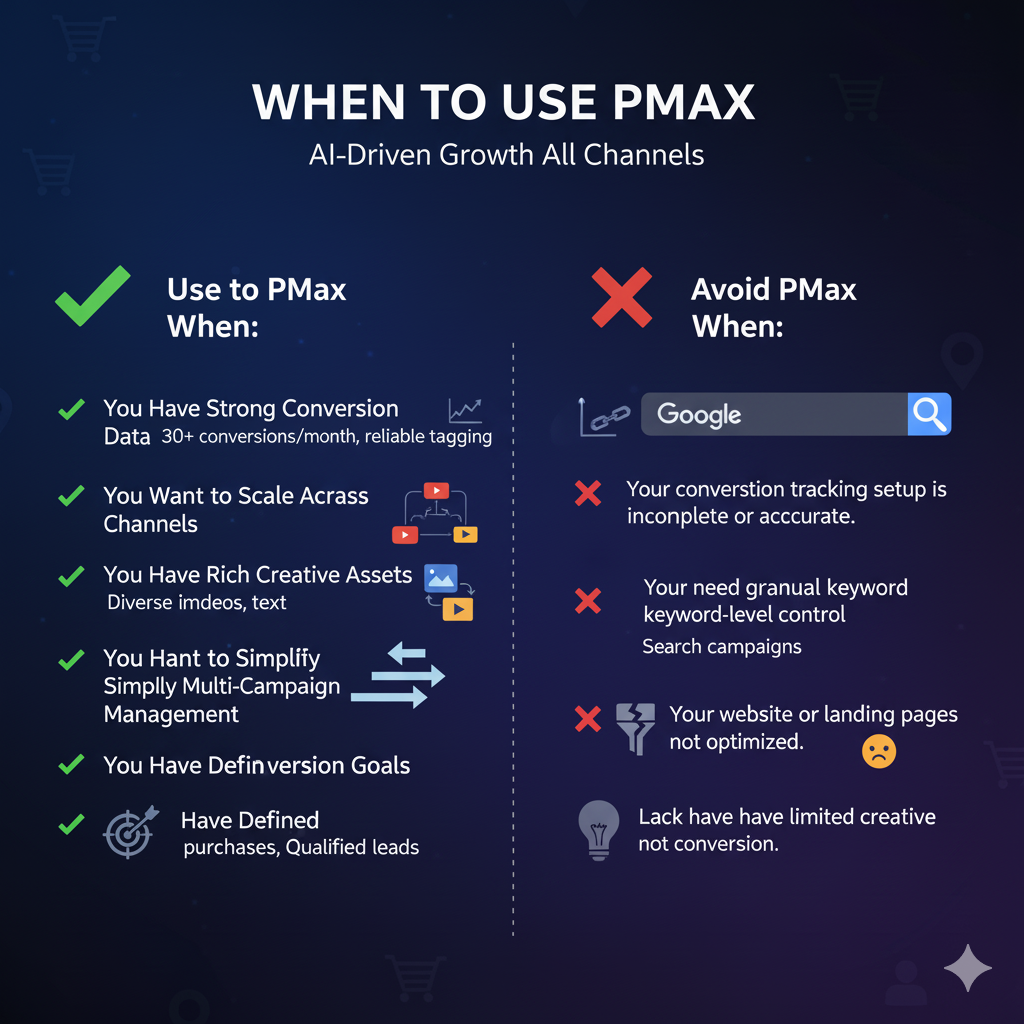
When to Use PMax
Performance Max campaigns are not a one-size-fits-all solution. The key lies in when and how to deploy them within your marketing mix.
✅ Use PMax When:
- You Have Strong Conversion Data
PMax thrives on data. If you have at least 30+ conversions per month with reliable tagging (via GTM or GA4), PMax will optimize efficiently. - You Want to Scale Across Channels
PMax automatically extends your reach across YouTube, Search, Display, Discover, and Maps — ideal for brands aiming for full-funnel visibility. - You Have Rich Creative Assets
The more diverse your image, video, and text creatives, the better PMax performs. Creative variety fuels Google’s machine learning engine. - You Want to Simplify Multi-Campaign Management
For advertisers managing multiple campaigns across ad types, PMax consolidates them into one unified framework. - You Have Defined Conversion Goals
Clear goals (e.g., “Increase online purchases” or “Generate qualified leads”) help the system align bidding and targeting.
❌ Avoid PMax When:
- Your conversion tracking setup is incomplete or inaccurate.
- You need granular keyword-level control (Search campaigns still outperform here).
- Your website or landing pages are not optimized for conversion.
- You have limited creative resources (since asset diversity drives machine learning outcomes).
Campaign Structure: Building a Scalable PMax Strategy
While PMax campaigns are automated, structure still matters. Poorly planned asset groups and signals can dilute performance and waste ad spend.
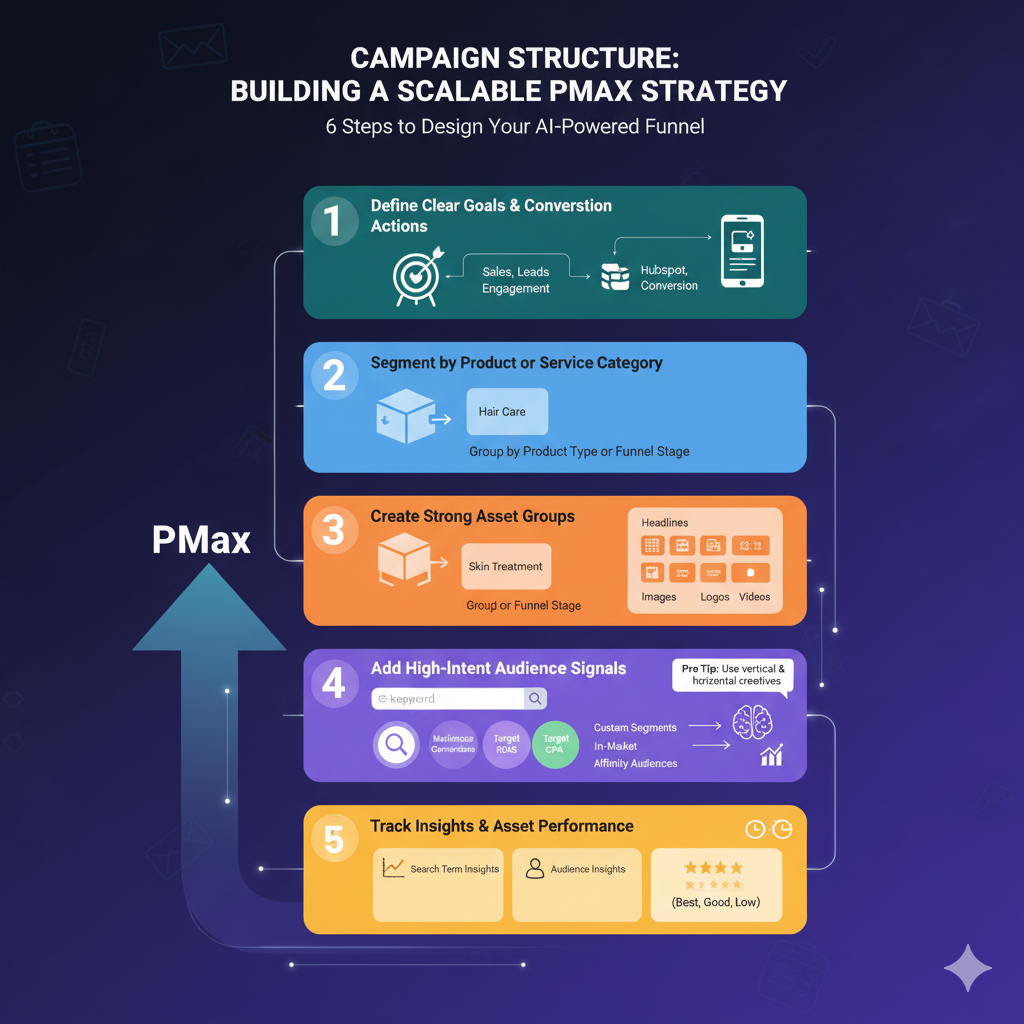
Here’s how to design a PMax campaign built for scale and intelligence:
1. Define Clear Goals and Conversion Actions
Start by choosing your primary campaign goal — Sales, Leads, or Engagement.
Then, in Google Ads → Settings → Conversions, ensure you have proper tracking through Google Tag Manager (GTM) or Google Analytics 4 (GA4).
For lead-based businesses, integrate your CRM (HubSpot, Zoho, or Salesforce) to push offline conversions back into Google Ads.
2. Segment by Product or Service Category
Avoid lumping all products into one PMax campaign. Instead:
- Group by product category (e.g., “Hair Care,” “Skin Treatment,” “Accessories”)
- Or by funnel stage (e.g., Awareness vs. Remarketing)
This gives AI clear boundaries and helps you analyze performance more effectively.
3. Create Strong Asset Groups
Each Asset Group in PMax acts like an ad group in traditional campaigns.
Include:
- Headlines (5) – mix emotional and benefit-driven lines
- Descriptions (5) – clear, value-oriented messaging
- Images (15) – product, lifestyle, and infographics
- Logos (2) – for brand consistency
- Videos (1–2) – product demos or testimonials
Pro Tip: Use a mix of vertical and horizontal creatives — Google’s AI auto-optimizes placements, but aspect ratio variety improves results.
4. Add High-Intent Audience Signals
Audience signals guide Google’s AI on who to target first.
Create custom signals based on:
- Search Intent: Keywords your users are likely searching.
- Custom Segments: Visitors to competitor domains.
- Customer Lists: Upload CRM data for remarketing.
- Affinity & In-Market Audiences: Layered for precision.
Even though PMax auto-expands beyond your input, these signals speed up the learning phase.
5. Use Smart Bidding Strategically
Performance Max integrates with Smart Bidding strategies such as:
- Maximize Conversions – for volume-based campaigns
- Maximize Conversion Value – for eCommerce ROAS goals
- Target CPA / ROAS – for mature accounts with stable data
Start broad (Maximize Conversions), then refine towards ROAS or CPA once you’ve gathered enough conversion data.
6. Track Insights and Asset Performance
Under the Insights tab, monitor:
- Search term insights – reveals hidden queries
- Audience insights – which signals are converting
- Asset performance ranking – “Best,” “Good,” or “Low” assets
Pause or replace low-performing assets every 3–4 weeks to keep your campaign fresh and learning active.
Do’s and Don’ts of PMax Campaigns
Automation doesn’t mean you stop optimizing — it means you start optimizing smarter.
✅ Do’s
- Feed the Algorithm Quality Data
Integrate GA4 and offline conversions. Clean data = clean optimization. - Refresh Creatives Every 30 Days
PMax favors variety. New visuals prevent ad fatigue and improve CTR. - Leverage Audience Signals Regularly
Test new custom segments based on behavior, intent, or demographics. - Run Experiments
Duplicate your PMax campaign and tweak audience signals or bidding — measure lift via Experiments in Google Ads. - Monitor Asset Performance Weekly
Identify “Low” rated assets and replace them proactively.
❌ Don’ts
- Don’t Launch Without Conversion Tracking
You’ll waste spend. Always verify tags via GTM preview or Tag Assistant. - Don’t Mix Too Many Products in One Campaign
It confuses Google’s optimization model and weakens signal strength. - Don’t Neglect Your Landing Pages
A perfect PMax campaign can’t fix a poor user experience. - Don’t Change Bidding Too Often
Let campaigns stabilize for 2–3 weeks before major bid adjustments. - Don’t Ignore Manual Campaigns Entirely
PMax complements, not replaces, Search campaigns. Keep a hybrid setup for control and scale.
Advanced Tips for 2025 PMax Optimization
- Use GA4 Custom Reports to identify cross-channel contribution (e.g., YouTube assisting conversions).
- Implement Ad Scheduling Rules based on performance hours (via “When & Where Ads Showed”).
- Create Separate Campaigns for New vs. Returning Users to manage budget allocation better.
- Leverage Merchant Center Feeds for automated eCommerce asset updates.
- Integrate with Offline Conversions API to close the data loop between online and store sales.
Conclusion
Performance Max in 2025 isn’t just an automation tool — it’s an ecosystem.
It combines creative intelligence, machine learning, and conversion tracking to deliver a full-funnel experience across Google’s most powerful channels.
However, success depends on your inputs, structure, and analysis discipline. Treat PMax as a living campaign that learns with your data — and it will become the cornerstone of your paid media growth strategy.
Because in a world where ad automation dominates, the real advantage lies not in who uses Performance Max — but in who uses it smarter.


No Comments