
Table of Contents
Everything you need to know about XML sitemaps, what makes them fail silently, and how they connect to your AI search visibility.
In a digital marketing landscape where the conversation has shifted entirely toward AI search, conversational interfaces, and generative content, it can feel anachronistic to write about XML sitemaps — a technology introduced in 2005 by Google, Yahoo, and Microsoft as a simple way for websites to tell search engines about their content.
And yet: in every comprehensive technical SEO audit, in every site that has mysterious indexation gaps or content discoverability issues, in every case of a well-written article that should rank but isn’t being found — there’s a meaningful probability that a misconfigured or neglected XML sitemap is a contributing factor.
The fundamentals don’t become irrelevant because the advanced technology gets more interesting. They become more important — because as the systems that determine content visibility become more sophisticated, the technical foundation that allows those systems to find and correctly process your content matters more, not less.
This is the complete guide to XML sitemaps in 2026: what they are, what they should contain, the specific failure modes that hurt real sites, how to audit and fix yours, and why clean sitemap management has direct implications for your content’s visibility in AI-powered search.
What an XML Sitemap Actually Does (And What It Doesn’t)
An XML sitemap is a structured file — in XML format — that lists the URLs on your website that you want search engines to know about and consider for indexation. It provides a direct communication channel between your website and search engine crawlers, separate from the process of crawlers discovering pages by following links.
What a sitemap does:
- Ensures discovery of orphaned content. Pages that exist on your site but have no inbound links — either from other pages on your site or from external sites — may never be discovered through standard link-following crawl. A sitemap tells the crawler these pages exist.
- Prioritises crawl allocation. For large sites with significant content volume, crawlers must make allocation decisions about where to spend crawl budget. A sitemap that clearly identifies the most important, most recently updated content helps the crawler prioritise efficiently rather than allocating crawl to low-value or outdated pages.
- Communicates content freshness. The
<lastmod>tag in a sitemap indicates when a page was last meaningfully updated. When used accurately, this signal helps crawlers prioritise recrawling updated content over unchanged content.
- Provides a direct submission mechanism. Submitting the sitemap through Google Search Console gives you a direct channel to request indexation of the pages you’ve identified as important, rather than waiting for crawlers to discover them through organic link-following.
What a sitemap doesn’t do:
- Guarantee indexation. Google’s decision to index a page is based on quality signals — content value, duplicate content checks, spam assessment — not simply the page’s presence in a sitemap. Including a URL in a sitemap does not guarantee it will be indexed, and excluding a URL does not prevent it from being indexed (crawlers can still discover it through links).
- Override quality signals. A sitemap is a discovery and prioritisation tool, not a quality certification. Including low-quality pages in a sitemap doesn’t make them more likely to rank.
The XML Sitemap Structure
A valid XML sitemap has a specific structure that is worth understanding, both to ensure technical validity and to understand which elements provide genuine SEO value.
The required structure:
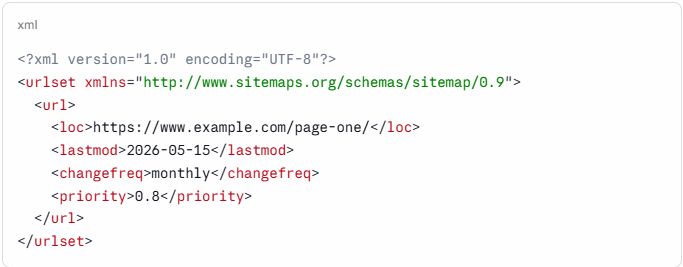
The <loc> element is the only required element — the URL of the page. All other elements are optional, but some are significantly more valuable than others.
<lastmod> — Use it accurately or don’t use it:
The <lastmod> tag indicates when the page was last significantly updated. When used accurately — populated dynamically from the actual content modification date — it is a valuable signal that helps crawlers prioritise recrawling updated content.
When used inaccurately — set to today’s date for all pages on every sitemap generation regardless of actual update history — it is actively harmful. Google has explicitly stated that consistently inaccurate <lastmod> values cause it to stop trusting the signal entirely, undermining the crawl prioritisation benefit it was meant to provide.
<changefreq> — Low value, often misleading:
The <changefreq> tag was designed to indicate how frequently a page typically changes. In practice, Google has indicated it pays minimal attention to this tag, as the actual crawl frequency is determined by observed change patterns rather than declared intentions. It can safely be omitted from most sitemaps without any SEO impact.
<priority> — Relative only, often overused:
The <priority> tag indicates the relative priority of pages within the sitemap — from 0.0 to 1.0. Critically, this is a relative value within the sitemap, not an absolute importance signal to Google. Setting all pages to 1.0 provides no signal because it removes the relative differentiation the tag is designed to provide. If used, priorities should actually differentiate between your most important pages (0.8-1.0) and your less important ones (0.4-0.6).
The Most Common XML Sitemap Errors That Actually Hurt SEO
Technical SEO audits consistently surface the same sitemap errors across a wide range of websites. These are the ones that produce real, measurable discoverability problems.
Error 1: Including Non-Canonical URLs
Your sitemap should only include canonical URLs — the version of each page you want indexed. A page that has a <link rel="canonical"> pointing to a different URL should not be in the sitemap, because you’re simultaneously telling Google “this page’s canonical version is somewhere else” and “please index this page.”
Google will interpret this as a contradiction and typically follow the canonical tag rather than the sitemap — but the presence of non-canonical URLs in the sitemap creates crawl confusion and wastes crawl budget on URLs that won’t be indexed.
The fix: generate sitemaps dynamically from your canonical URL list, not from a general list of all URLs on the site.
Error 2: Including Redirect URLs
When a page has moved and the old URL redirects to a new one, the sitemap should list the new URL only. Including the old (redirecting) URL in the sitemap sends crawlers to the redirect chain and misses the opportunity to directly indicate where content has moved.
For sites that have undergone significant restructuring — URL changes, domain migrations, content consolidations — sitemap cleanup is often one of the highest-value technical tasks, removing redirect chains that the sitemap is actively steering crawlers toward.
Error 3: Including 404 Pages
Including URLs that return 404 (not found) or 410 (gone) status codes in a sitemap is directly counterproductive. The sitemap is telling Google “these pages are important and should be indexed” while the server is telling Google “these pages don’t exist.”
Stale sitemaps — generated once and never updated as content is deleted, moved, or restructured — accumulate 404 URLs over time. Regular sitemap audits using a crawler tool (Screaming Frog, Sitebulb, or similar) that checks the status code of every URL in the sitemap and flags non-200 responses are essential maintenance for active websites.
Error 4: Missing Recently Published Content
The inverse of the 404 problem: sitemaps that are generated infrequently may not include recently published content for weeks or months after publication, leaving new articles and pages to be discovered only through Google’s organic link-following crawl.
For content-heavy websites, automated dynamic sitemap generation — sitemaps that rebuild automatically when new content is published — eliminates this problem. CMS platforms like WordPress, with appropriate plugins, can generate real-time sitemaps that include new content immediately upon publication.
Error 5: Sitemaps That Exist But Were Never Submitted
Creating a sitemap and placing it at the standard location (domain.com/sitemap.xml) makes it accessible to crawlers, but explicitly submitting it through Google Search Console provides additional benefits: direct acknowledgment that Google has processed the sitemap, visibility into indexation statistics for the URLs included, and the ability to monitor for errors in the Search Console Sitemaps report.
An extraordinary proportion of technically valid sitemaps are simply never submitted to Search Console — removing the visibility and monitoring benefits that make sitemap management more than an act of faith.
Error 6: Sitemap Index Files That Reference Missing Sitemaps
For large websites that use sitemap index files (a sitemap that references multiple child sitemaps), broken references — pointing to child sitemaps that no longer exist or have moved — produce crawl errors and incomplete indexation coverage.
Regular validation of sitemap index files, verifying that every referenced child sitemap URL returns a valid XML sitemap, is maintenance work that protects against silent indexation gaps in large content libraries.
XML Sitemaps and AI Search Visibility
The connection between XML sitemap quality and AI search visibility is indirect but real, operating through the indexation mechanism.
Google’s AI systems — AI Overviews, AI Mode, the AI response generation infrastructure — draw from Google’s indexed content. Pages that are not indexed, or that are indexed incompletely or with quality signals that suggest low value, are not available to the AI response generation systems.
A well-maintained sitemap that helps Google efficiently discover, crawl, and index your full content library is the technical foundation that makes your content available for AI citation. A sitemap riddled with 404s, redirect chains, and non-canonical URLs creates crawl confusion that may leave your most important content under-indexed or indexed with quality signals lower than the content itself deserves.
The specific implication: for brands investing in content quality for AI search visibility — producing the original research, structured frameworks, and expert-level content that AI systems cite — ensuring that content is optimally indexed through clean sitemap management is the technical prerequisite for the content strategy to work.
The AI can’t cite content it hasn’t properly indexed.
The 30-Minute Sitemap Audit
A comprehensive sitemap audit doesn’t require enterprise tooling. Here’s a practical audit process that identifies the most common issues:
- Step 1: Find and access your sitemap. Check domain.com/sitemap.xml and domain.com/sitemap_index.xml. If neither exists, that’s the first issue to address.
- Step 2: Check for Search Console submission. Open Google Search Console → Sitemaps. Is your sitemap listed and showing a green “Success” status? If not, submit it.
- Step 3: Review the Search Console sitemap report. How many URLs are submitted versus how many Google has indexed? A significant gap (more than 20% of submitted URLs not indexed) warrants investigation.
- Step 4: Crawl the sitemap URLs for status codes. Using Screaming Frog (free version crawls up to 500 URLs), Sitebulb, or a similar tool, fetch all URLs from the sitemap and check their HTTP status codes. Any non-200 responses (301, 302, 404, 410) require action.
- Step 5: Check for canonical mismatches. For a sample of URLs in the sitemap, verify that the page’s declared canonical tag matches the sitemap URL exactly (including trailing slash consistency, HTTP vs HTTPS, www vs non-www).
- Step 6: Verify freshness. When was the sitemap last generated? Does it include your most recently published content? Is
<lastmod>accurately reflecting actual content modification dates?
This audit takes 30-60 minutes for most websites and typically surfaces actionable technical issues that, once resolved, produce measurable improvements in crawl efficiency and indexation completeness.
XML Sitemap Foundation Isn’t Glamorous, It’s Load-Bearing.
XML sitemaps are not the most exciting component of a digital marketing strategy. They are not going to generate the kind of discussion that AI Mode advertising or ChatGPT conversion ads generate. They don’t produce case study-worthy performance spikes that make compelling slides.
What they do is ensure that the content you invest in producing actually gets found, indexed, and made available to the systems — including AI systems — that determine what gets seen by your audience.
In an era where visibility in AI-generated responses is becoming a primary marketing objective, the technical infrastructure that determines what Google can find and index from your website is not optional maintenance. It’s the prerequisite for every other visibility strategy to function.
The foundation isn’t glamorous. It is, however, load-bearing.
The Brisk Digital conducts technical SEO audits that cover sitemap health, indexation analysis, and the full technical infrastructure that determines whether a brand’s content is positioned for organic and AI search visibility. If you want to know whether your site’s technical foundation is working for or against your content investment, we’re glad to take a look.




No Comments